
Introduction
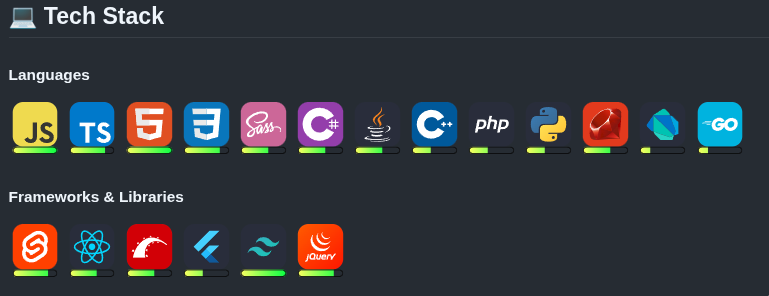
Like many developers, I recently found myself on a quest to create a kick-ass GitHub README that showcases all of my skills and projects in the cleanest, coolest way possible. As part of this, I included icons from the skill-icons project to showcase my different skills. But in pursuit of perfection, a simple list of icons will not do - I wanted a visual indicator of how proficient I was in each skill. Thus was born skill-progress (github) - a simple microservice that generates a progress bar to showcase skill proficiency anywhere on the web. The service provides a simple API that augments any image with a progress bar that represents a skill level from 1-5.
Inspiration
While I found skill-icons to be a great way to showcase my skills, I wanted to add a little bit more of my own touch - a visual indicator of proficiency level in each technology. I decided on a progress bar below the image, originally inspired by this linear progress component, but wanted to integrate it more seamlessly with the skill icon.
I initially created a set of progress bar SVGs that stepped from 1-5 and experimented with laying them out in HTML inside of a README. Due to the limitations of HTML/CSS in Markdown, however, this solution proved futile. Even if I got that working, it would mean adding tons of layout code for each one of the skill icons. I wanted something more elegant, more flexible.
While the idea of a microservice that generates content for GitHub README’s is nothing new (there are tons of GitHub README icon/label/progress/stats/etc generators), I was unable to find any existing solutions that provided exactly what I wanted:
- Drop-in replacement for the skill icons service - a url that returns an image
- Native support for the official skill-icons as well as my own custom skill icons and any other arbitrary images
- Configurable: icon, size, progress level, colors, styles, etc.
- Hosted as a microservice with no client side build steps
- Compatible with GitHub README or HTML on a website (I plan to use this feature in my portfolio website - nathanhoyt.dev)
Architecture and Tech Stack
Application Flow
- Requests come in with either a
skillorimageparam and alevelparam (1-5) - Fetch skill image:
skillfrom custom skill-icons provided by my project or official skill icons from the skill-icons CDNimagefrom provided URL
- Generate progress bar SVG based on
level - Composite icon and progress bar into a single SVG image
- Return SVG response
Tech Choices
- TypeScript for type safety and tooling ecosystem
- Express for local development or deployment to a standard web server.
Netlify Functions for serverless deployment, since I already use Netlify for most of my other publicly hosted projects.- Railway for public hosting, Netlify Functions has limitations not compatible with this project.
- SVG format for scalable graphics with low overhead and no need to use external image processing libraries.
- skill-icons for base skill set, since I like the way they look
Why Netlify Railway
The biggest reason I chose to use Netlify for production deployment is that I am already very familiar with the platform and already have several production sites deployed there. They provide a generous free tier, automatic scaling, continuous deployment by connecting directly to my GitHub repo, and easy deployments of serverless functions.
After writing the first revision of this article, I encountered issues using Netlify functions for this service, mainly performance. Netlify containers do not persist state between requests, and a cold start means slower responses and renders my in-memory cache (discussed later) useless. I switched to a Railway app, since it is always up and has persistent RAM. This does mean I now have to pay for hosting, but the $5 introductory tier should be more than enough for this service right now. I also enjoyed the chance to gain experience with a new hosting platform.
API design
Core parameters
The following parameters are provided for customizing the output of the /progress route:
| Param | Required | Description |
|---|---|---|
skill |
one of | skill-icons name (js, ts, react, etc.) This can be one of the official skill icons, or one of the custom skill icons provided by this service |
image |
one of | Custom image URL |
level |
no | 1–5 proficiency level (if not supplied, the service returns the requested image with no progress bar) |
size |
no | 16–512px, default 48px |
style |
no | rounded (default) or flat |
startColor |
no | Gradient start (hex, no leading #) |
endColor |
no | Gradient end (hex, no leading #) |
Examples
Basic example
1
https://skillprogress.dev/progress?skill=js&level=4
Output: 
Custom image
1
https://skillprogress.dev/progress?image=<some_image_url>&level=4
Styled example
1
https://skillprogress.dev/progress?skill=convex&level=4&size=96&startColor=667eea&endColor=764ba2
Output:
Frontend
As part of this project, I also added a frontend web app with a landing page and URL builder. Check it out at skillprogress.dev. The landing page gives a quick overview of what the service does and shows a list of the available custom icons. The builder page lets users fill out a form to generate a live preview and a copyable URL.
Frontend Tech Stack
The frontend app uses React, TypeScript, and Vite for build and live dev previews. It uses React Router for SPA routing with two routes: / and /builder. The frontend UI is intentionally lightweight and minimal with no databases, auth, or heavy UI libraries (aside from React, which might be a bit overkill in this instance)
URL Builder
The builder page is a simple form with a live image preview and an auto generated link that can be copied and pasted into a README or used as an image source on a website. The builder contains a field for each parameter supported by the service. The skill field has filtering and search, with icon previews in each list element.
Implementation Highlights
SVG Composition
The internal image generation code generates an SVG tag that embeds both the source image and the progress bar. For the source layer, it directly embeds the SVG element for an SVG, or an embedded image in the SVG for a raster image. For the progress bar, the SVG is always directly embedded since all progress bars are guaranteed to be an SVG.
Handling of custom colors involves a string replace of the original gradient colors with the custom color stops if provided. This method is not ideal. I think eventually I want the progress bars to be generated in code entirely, and just use string interpolation of provided gradient color stops, progress bar size, and other customizable properties for the progress bar.
Sizing is handled by first generating the final image at a size of 48, parsing the result using xmldom library, resizing, and then converting back to a string.
After publishing the first version of this article, I did some profiling and made some performance improvements based on the results. The main performance issue was using the xmldom parser library, when my desired result could be achieved with simple string replacement operations. Now the skill images are stored as a custom SVG object that simply wraps an svg string with some helper methods:
sanitize()- removes any xml headerssetAttribute(name, value)- Replace an arbitrary attribute value (used for size currently)replaceColor(oldColor, newColor)- Replace a hex color in the source with a new one
New generate function
1
2
3
4
5
6
7
8
9
10
11
12
13
14
15
16
17
18
19
20
21
22
23
24
25
26
27
28
29
30
31
32
33
34
35
/**
 * Generate the progress SVG for a given skill and level
 * @param skillImage - The SVG element for the skill
 * @param levelSvg - The SVG element for the level
 * @returns The progress SVG
 */
const generateProgressSvg = (
    skillImage: CustomImage,
    level: number,
    style: string,
    size: number,
    startColor: string | undefined,
    endColor: string | undefined,
): string => {
    const levelSvg = getLevelSvg(level, style, startColor, endColor);

    const imageData = skillImage.mimeType.includes('image/svg+xml')
        ? `<g transform="translate(0, 0)">${skillImage.data}</g>`
        : `<image href="data:${skillImage.mimeType};base64,${skillImage.data}" width="48" height="48" />`;

    const levelData = levelSvg
        ? `<g transform="translate(0, 48)">${levelSvg}</g>`
        : '';

    const svgData = `
        <svg width="48px" height="48px" viewBox="0 0 48 ${levelSvg ? '56' : '48'}" xmlns="http://www.w3.org/2000/svg">
            ${imageData}
            ${levelData}
        </svg>
    `;

    const resizedSvg = resizeSvg(svgData, size);
    return resizedSvg;
};
SVG Wrapper
1
2
3
4
5
6
7
8
9
10
11
12
13
14
15
16
17
18
19
20
21
22
23
24
25
26
27
28
29
30
31
class SVG {
    constructor(private source: string) {
        this.source = this.sanitize(source);
    }

    sanitize(string: string): string {
        return string.replace(/<\?xml.*\?>/g, '');
    }

    setAttribute(name: string, value: string): void {
        this.source = this.source.replace(
            new RegExp(`${name}=".*?"`),
            `${name}="${value}"`,
        );
    }

    replaceColor(oldColor: string, newColor: string): void {
        const normalizedOldColor = oldColor.replace(/^#/, '');
        const normalizedNewColor = newColor.replace(/^#/, '');
        this.source = this.source.replace(
            new RegExp(`#${normalizedOldColor}\\b`, 'gi'),
            `#${normalizedNewColor}`,
        );
    }

    toString(): string {
        return this.source;
    }
}

export { SVG };
Custom icons
One big benefit of this library over using the original skill-icons library is that I have full control over what custom icons are included in the project. Since the maintainers of skill-icons have stopped accepting PRs (or perhaps never accepted any) for new icons - and have not updated the repo in years - this project allows me to have even better functionality, while also giving me the ability to create and accept submissions of new icons myself.
So far I have added the convex logo to this project, since it was one of the main skills I wanted to showcase. I may at some point go through the PRs on skill-icons and add the icons users have submitted there. (Maybe write a script to scrape them automatically)
Caching and performance
I implemented super basic in-memory caching of remote URLs by simply saving the data returned to a HashMap. Each time a request comes in, the application first checks the cache for the image URL, and then validates that the cached results are not stale. If the cache entry’s age is less than the TTL (24 hours currently) then the cached result is returned, otherwise the cache entry is removed, and a new one is created after fetching new data from the remote URL.
1
2
3
4
5
6
7
8
9
10
class CacheEntry {
    constructor(public image: CustomImage, public timestamp: number) {
        this.image = image;
        this.timestamp = Date.now();
    }

    isExpired() {
        return Date.now() - this.timestamp > cacheTTL;
    }
}
1
2
3
4
5
6
7
8
9
10
11
12
13
14
15
16
17
18
19
20
21
22
23
24
25
const fetchWithCache = async (
    imageUrl: string
): Promise<CustomImage | null> => {
    // Check cache and return if found
    if (cacheMap.has(imageUrl)) {
        const cacheEntry = cacheMap.get(imageUrl);
        if (cacheEntry && !cacheEntry.isExpired()) {
            console.log(`Cache hit for ${imageUrl}`);
            return cacheEntry.image;
        } else {
            console.log(`Cache expired for ${imageUrl}`);
            cacheMap.delete(imageUrl);
        }
    }

    // Fetch image
    const image = await fetchImage(imageUrl);

    // Cache image
    cacheMap.set(imageUrl, new CacheEntry(image, Date.now()));
    console.log(`Cached ${imageUrl}`);

    // Return image
    return image;
};
Future considerations for this functionality are:
- Ensuring that stale cache entries are removed after expiring, via some sort of garbage collection functionality
- Ensuring that cache does not balloon and consume too much memory, crashing the application.
- Evaluate real-world performance improvements, and optimal TTL value.
Real World Usage
This project is currently used on my GitHub profile README as well as my developer portfolio - (nathanhoyt.dev).
Lessons and Takeaways
What worked well
Query Param API - The query parameter based API is super simple and allows the project to be used from basically anywhere that you can embed remote images.
SVG Output - Using SVG as the output format worked great for several reasons:
- Lightweight code, no image decoding, rasterization, etc.
- Easy compositing of source images, even raster images by simply embedding them in the SVG output.
- Control over image properties using
xmldomlibrarySVGwrapper to modify SVG properties.
skill-icons CDN - The skill-icons CDN provides a great starter source for icon images, and using that in conjunction with custom icons and arbitrary image URLs allows for maximum customization while maintaining a low barrier to entry.
Challenges
SVG composition - Supporting multiple image formats required me to work through the problem of decoding the mime type and base64 encoding the image data.
Supporting both express and netlify in one codebase - Since express is an HTTP server built in JS, and Netlify functions are serverless, the two don’t exactly integrate seamlessly. However, I was able to get an implementation that would deploy correctly as a netlify serverless function or as an express server by decoupling the request handler from the server code, and then calling the handler from either the express handler function or the Netlify function, with a little bit different syntax for each.
Reusable Patterns
Netlify and TypeScript workflow - This project can be used as a reference for future TypeScript projects that are deployed as serverless functions on Netlify.
Custom Icons - This pattern is not yet fully developed, but I would like to flesh out a standardized method of adding additional custom skill icons to allow for easier community contribution.
Planned improvements
Done:
- Allow custom progress bar colors
- Custom output size (generate at 48×48 then resize)
- Cache skill-icons
- Native support for simple-icons
- Skill level optional. (for generating icon without a progress bar at all - this could allow people to contribute icons to my library since the skill-icons maintainers no longer accept new icons)
- Base route should redirect to project homepage on GitHub instead of 404 - project now has a full frontend with landing page and URL builder form
New Features:
- Add more custom icons (can scrape the PRs on the skill-icons repo and add all the icons that the maintainer won’t accept on that project)
- Allow for labels and use of emojis as progress bar (https://stackoverflow.com/questions/24768630/is-there-a-way-to-show-a-progressbar-on-github-wiki/61857070#61857070)
- Generate SVGs from scratch so that any percentage can be used, instead of just the 1-5 steps.
- Add support for additional input image types (webp, etc.)
- Vertical progress bar option (to left/right of image).
Cache:
- Store expiration time of cache instead of calculating on every request.
- Garbage collect expired cache entries even if they have not been requested and refreshed.
- Upper bounds on cache size, delete oldest entries when size limit reached.
Conclusion
This was a fun project to work on, and probably my most generally-useful-to-the-public open source project to date. Even though I threw it together in a couple of days, this was a great learning experience. I am excited to continue maintaining this project and implementing new features on a regular basis.
Try it out in your own README today and share your feedback with me!
To get involved:
- Use it in your project
- Submit a feature request, bug report or a request for a custom skill icon
- Star the repo on GitHub: